Mobile App Development Mistakes to Avoid for Business Success
Most businesses assume that building a mobile app is primarily a design and coding challenge. The research tells a different story: the decisions made before a single line of code is written, such as market validation, platform strategy, and feature prioritization, determine whether an app succeeds or dies quietly in an app store.
The mobile app failure rate is high enough to be uncomfortable. Gartner has estimated that less than 0.01% of consumer mobile apps become financially successful. That figure should reframe how any business approaches the process. The mistakes below are not edge cases. They are common, well-documented, and avoidable.
Skipping User Research Before Development Begins
Building an app around assumptions about what users want is one of the fastest ways to waste a development budget. User research does not need to be a six-month academic exercise. Even ten structured interviews with people in your target segment will surface assumptions that would have cost you weeks of rework later.
The mistake most teams make is treating the app as an internal product decision rather than a market test. They build what the stakeholders want, not what the end user needs. The result is an app with features nobody asked for and missing the one workflow that would have driven daily retention.
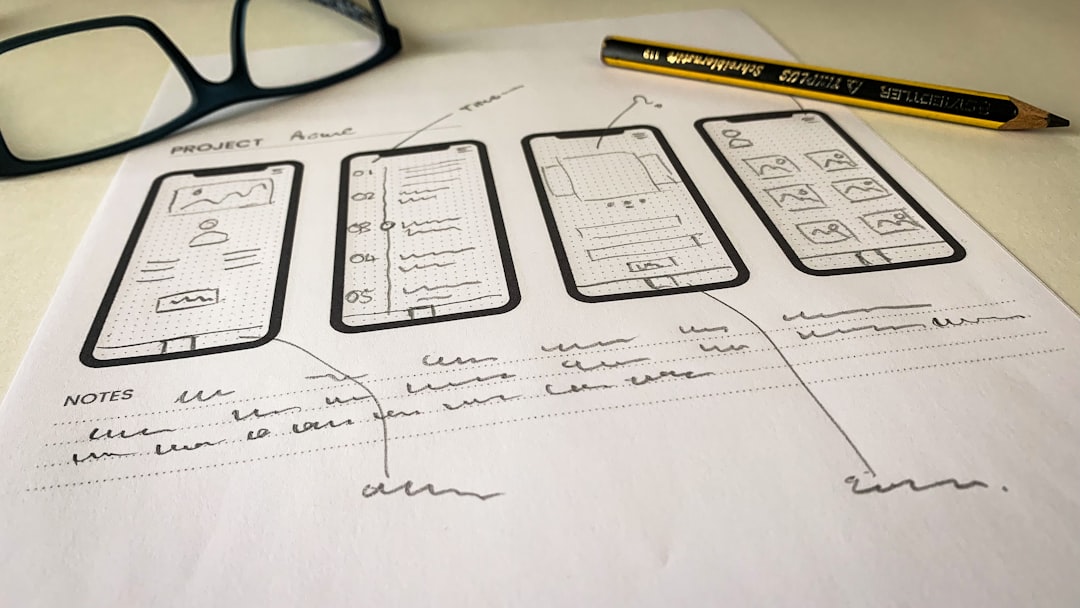
Wireframing and prototyping before development is standard practice at shops with strong track records. Tools like Figma allow you to put a clickable prototype in front of real users within days. Their confusion, their hesitation, their unexpected navigation paths tell you more than any internal review meeting will.
Trying to Build for Every Platform at Once
Cross-platform frameworks like React Native and Flutter have improved significantly, but choosing your initial platform still matters. Businesses frequently try to launch on iOS and Android simultaneously with a limited budget, which forces compromises on both. The smarter path, particularly for early-stage products, is to identify where your target users actually spend their time and focus there first.
If your core audience is enterprise professionals in North America, iOS has historically held a stronger share in that segment. If your audience is price-sensitive consumers in Southeast Asia or Latin America, Android dominates the market. Platform choice should follow audience data, not internal preference.
Cross-platform development makes sense once you have a validated product and the resources to maintain it properly. Launching thin versions on two platforms at once often means you fix bugs twice, test twice, and fail to do either version justice. Ship one platform well before you spread the effort.
Overloading the First Release with Features
Feature bloat kills apps. A team gets excited about the possibilities, the roadmap grows, and by the time the app ships it is trying to do fifteen things at once and doing none of them particularly well. Users do not want comprehensive. They want fast, reliable, and focused.
The minimum viable product concept is not new, but businesses still routinely ignore it under pressure from internal stakeholders who want to see their use case in version one. The discipline required here is saying no, which means having a clear definition of the core problem the app solves and refusing to expand that scope until the core is solid.
Amazon, Facebook, and Instagram all launched with stripped-down versions of what they became. Instagram launched as a simple photo filter app. The broader feature set came after the core behavior was proven. Your business app does not need to be different. Define the one thing users will come back for and make that one thing excellent.
Every feature you add to a first release extends development time, increases the surface area for bugs, and complicates the user experience. Prioritize ruthlessly. Features cut from version one are not lost. They become version two, where you can build them with real usage data informing the design.
Neglecting Performance and Security Testing
An app that crashes or loads slowly does not get a second chance. Research from Google has consistently shown that 53% of mobile site visits are abandoned if a page takes longer than three seconds to load. App users are no more patient. Performance testing is not optional, and it should not happen only at the end of the build cycle.
Load testing, battery consumption testing, and behavior under poor network conditions all need to be part of the regular QA process. An app that performs well on a developer's high-end phone and a fast Wi-Fi connection may fail badly on a mid-range device on a 3G connection, which is the real-world environment for a large share of mobile users globally.
Security is the second non-negotiable. Mobile apps that handle user data, payment information, or authentication are targets. Common vulnerabilities include insecure data storage, improper session handling, and insufficient transport layer security. The OWASP Mobile Security Project publishes a regularly updated list of the top mobile application risks, and any development team should treat it as a mandatory reference, not an optional read.
Security breaches do not just cost money. They destroy user trust in ways that are very difficult to recover from. Build security reviews into each sprint, not just the final release gate.
Ignoring App Store Optimization and Post-Launch Maintenance
Shipping the app is not the finish line. Most businesses underestimate what happens after launch. App store optimization (ASO) is the practice of improving an app's visibility in the App Store and Google Play, and it uses many of the same principles as SEO. Title, description, keywords, screenshots, and ratings all affect how often an app appears in search results and how often those results convert to installs.
A common mistake is writing app store copy as a feature list. Users searching in an app store are looking for a solution to a problem. The copy should address their problem directly, not describe the product's architecture. Screenshots should show the app solving something the user recognizes, not generic UI screens.
Post-launch maintenance is where many business apps quietly decline. Operating systems update. Devices change. User behavior evolves. An app that is not updated regularly accumulates compatibility issues, falls in store rankings, and generates negative reviews that compound over time. Budget for ongoing maintenance from the start. A realistic figure often cited in the industry is 15 to 20 percent of the original development cost per year for maintenance and updates.
Monitor your app's reviews actively and respond to them. User reviews in app stores are both a customer service channel and a feedback system. Teams that engage with reviews and ship fixes to reported issues see measurable improvements in ratings over time. Ignoring reviews signals to potential users that the product is abandoned.
The businesses that get consistent value from mobile apps treat them as products, not projects. A project has an end date. A product has a lifecycle that requires sustained investment, measurement, and iteration. Set up analytics from day one, track retention and engagement, and make decisions based on what users actually do rather than what you assumed they would do. The mistakes above are not rare. Avoiding them is simply a matter of discipline and honest planning before the first sprint begins.